The Ultimate Advanced Postback Tracking Setup Workflow for Insane CPA Profits in 2026!
Welcome to the backend of highly profitable performance marketing. If you want to scale your affiliate campaigns from breaking even to printing money, mastering your advanced postback tracking setup is absolutely non-negotiable. Relying on outdated pixel tracking or the basic dashboards provided by your traffic sources will leave you completely blind to the metrics that actually matter.
In 2026, browser privacy updates and aggressive ad-blockers have made traditional cookie-based tracking obsolete. You must transition to server-to-server (S2S) tracking to capture every single click and conversion flawlessly. Here is the exact, step-by-step workflow to connect your traffic source, your landing page, and your affiliate network into one seamless, data-rich loop.
The “Quick Answer” / Key Takeaways Box
- The Foundation: Server-to-server tracking relies on a unique “ClickID” rather than browser cookies. This guarantees 100% accurate conversion reporting regardless of ad blockers.
- The Workflow: The tracker generates a unique ClickID when a user clicks your ad. This ID is passed to the affiliate network, and if a conversion occurs, the network “posts back” that exact ID to your tracker.
- Dynamic Tokens: An advanced postback tracking setup captures hyper-specific data points, including the user’s operating system, geographic location, and the specific ad creative they clicked.
- The Goal: You use this precise data to ruthlessly kill underperforming creatives and double down your budget on the exact sub-IDs that are generating profit.
Why Pixels Fail and Postbacks Win
A standard tracking pixel is a tiny piece of code placed on a “Thank You” page. When a browser loads the page, the pixel fires. However, in the adult affiliate marketing space and other direct-response niches, you rarely control the final conversion page.
Because the affiliate network owns the final checkout or sign-up page, you cannot place your own pixel code on it. Furthermore, modern privacy browsers automatically block third-party tracking pixels, leading to severely underreported conversions.
An advanced postback tracking setup completely bypasses the browser. Instead, your tracking server communicates directly with the affiliate network’s server behind the scenes. This ensures that every single conversion is recorded with absolute, unbreakable accuracy.
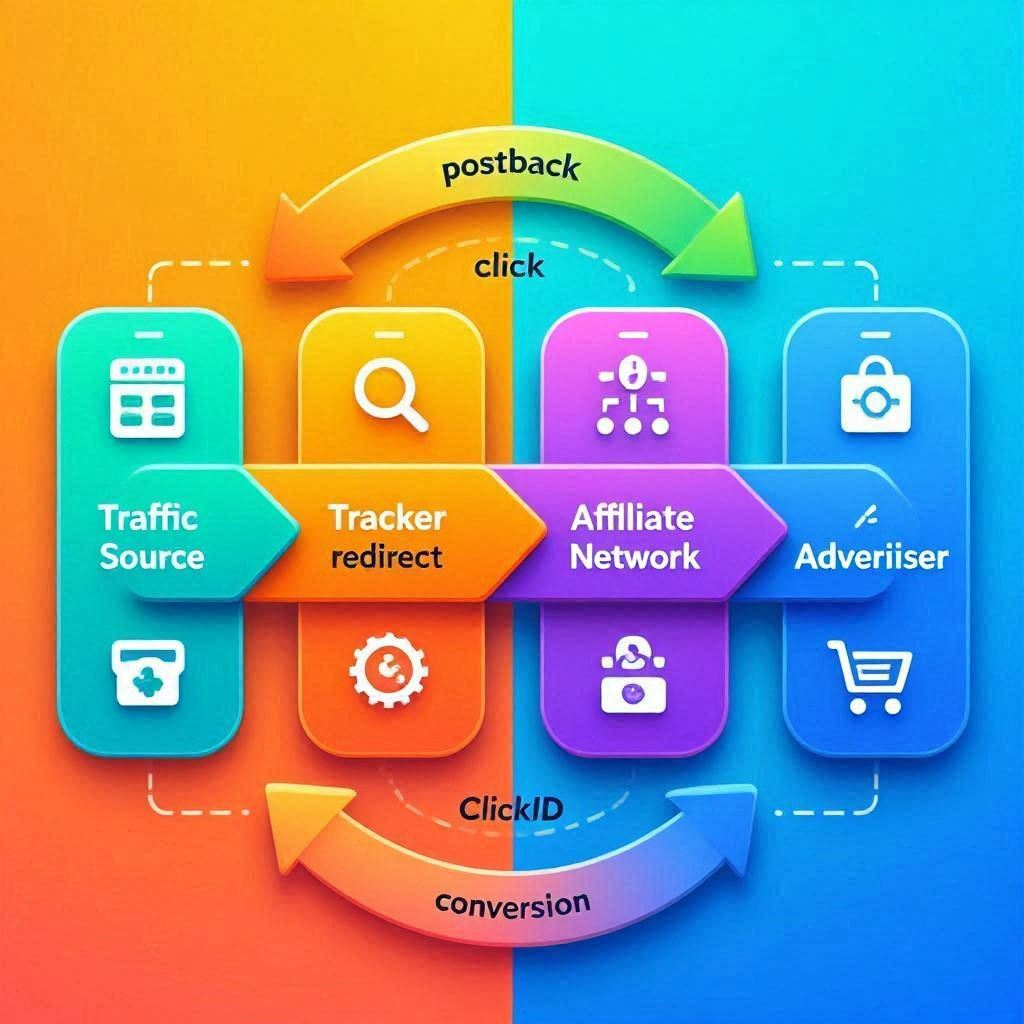
[IMAGE PLACEHOLDER: A flowchart diagram showing the journey of a ClickID from the traffic source, through the tracker, to the affiliate network, and back via the postback URL. Alt text: A visual representation of an advanced postback tracking setup.]
Step-by-Step Server-to-Server Workflow
Setting up S2S tracking feels intimidating initially, but it boils down to mapping parameters correctly. You are essentially making sure that the tracking software and the affiliate network are speaking the exact same language.
Step 1: Configuring the Tracker
First, you must create a campaign inside your premium tracking software. You will define your traffic source (e.g., ExoClick) and your affiliate network (e.g., CrackRevenue).
The tracker will generate a unique campaign URL. This is the link you will actually promote on your ad network. When a user clicks this link, the tracker generates a unique alphanumeric string known as the “ClickID” and attaches it to the user’s session.
Step 2: Passing the ClickID to the Network
When setting up your offer link inside your tracker, you must append a specific parameter to pass the ClickID to the affiliate network. Every network has a designated parameter for this.
For example, many networks use s1 or aff_sub to receive this data. Your offer URL inside the tracker should look something like this: [https://affiliatenetwork.com/offer?s1=](https://affiliatenetwork.com/offer?s1=){clickid}. Now, when the user lands on the offer, the network actively records your unique ClickID.
Step 3: Firing the Postback URL
If the user completes the desired action (like submitting an email or buying a product), the affiliate network’s server springs into action. It looks at the ClickID it received in Step 2 and uses your “Global Postback URL” to send a message back to your tracker.
You must copy your postback URL from your tracker and paste it into your affiliate network’s global postback settings. It will look like this: [https://yourtracker.com/postback?clickid=](https://yourtracker.com/postback?clickid=){s1}&payout={payout}. The network replaces {s1} with the actual ClickID and {payout} with your commission amount, instantly updating your dashboard.
[VIDEO PLACEHOLDER: YouTube embed demonstrating a live screen-share of configuring a postback URL between a tracking software and an affiliate network.]
Dynamic Tokens and Traffic Optimization
Once the core postback loop is established, you must leverage dynamic tokens to gather actionable intelligence. Tokens are placeholders that your traffic source uses to pass specific data to your tracker.
When configuring your traffic source inside your tracker, ensure you map tokens for the [Campaign_ID], [Creative_ID], [Device_OS], and [Geo]. When a conversion fires back through your advanced postback tracking setup, you will see exactly which banner ad in which specific city generated the money.
Armed with this granular data, you can immediately pause ads that are draining your budget and aggressively scale the placements that are converting profitably.
[INTERNAL LINK: Read our ultimate guide to filtering bot traffic and blocking fraudulent IP addresses in 2026.]
The Affiliate / Monetization Section: Premium Tracking Tools
To execute this workflow, you absolutely must invest in professional-grade tracking software. Free trackers will cost you thousands in lost data, downtime, and missed conversions. Here are the premium tools you need to build your tech stack:
- Voluum (via PartnerStack): The absolute gold standard for performance marketers. Voluum offers lightning-fast redirects, AI-powered traffic distribution, and unparalleled bot filtering. Promoting Voluum via PartnerStack offers incredibly lucrative recurring commissions for referring other digital marketers.
- BeMob (Direct Affiliate Program): An excellent, highly capable alternative for affiliates scaling up from beginner budgets. It offers flawless postback integration with all major adult and mainstream CPA networks.
- ClickMagick (via ShareASale): Ideal for marketers running traffic from mainstream sources who need deep integration with email autoresponders and complex funnel tracking.
Review the official IAB guidelines on server-to-server tracking compliance and data privacy.
Strategic Critique: Stress-Testing the Concept
What are the problems with this idea that I’m not seeing?
The sheer technical friction of parameter mapping. Every single affiliate network and traffic source uses different naming conventions for their tokens. If your tracker uses {clickid} but the network expects [s2], the entire advanced postback tracking setup breaks silently. You will spend thousands of dollars on ads while your dashboard shows zero conversions because the network cannot send the data back to the correct parameter. Rigorous, manual testing of every single tracking link before launching a campaign is a tedious but absolutely mandatory step.
What assumptions am I making that might not be true?
You are assuming that your tracking software’s reporting is 100% flawless right out of the box. It isn’t. Server latency, ad network reporting delays, and dropped connections can cause discrepancies between what your tracker shows and what your affiliate network actually pays out. You must manually audit your tracker’s revenue against your actual affiliate network balance every 48 hours to ensure you aren’t optimizing campaigns based on phantom data or missed postback fires.
If this idea failed, what would be the most likely reason?
Failure to analyze the data. An advanced postback tracking setup is completely useless if you do not actively use the data it provides. Many beginners spend hours configuring the perfect server-to-server loop, launch their campaigns, and then passively watch their budget drain. If you are not logging in daily to aggressively block non-converting widgets, pause poorly performing OS versions, and kill losing creatives based on the postback data, you have wasted your time building the infrastructure.






One Comment